




Skip to content
View in the app

A better way to browse. Learn more.

Audi Owners Club (UK)

A full-screen app on your home screen with push notifications, badges and more.

To install this app on iOS and iPadOS
  1. Tap the Share icon in Safari
  2. Scroll the menu and tap Add to Home Screen.
  3. Tap Add in the top-right corner.
To install this app on Android
  1. Tap the 3-dot menu (⋮) in the top-right corner of the browser.
  2. Tap Add to Home screen or Install app.
  3. Confirm by tapping Install.

Welcome to the Audi Owners' Club - An Independent community!

Membership is completely free, and our community is built by enthusiasts, for enthusiasts. We’re a proudly independentnon-official club, so all the help and opinions you’ll find here come directly from members with real experience of Audi ownership.

Join the club now!
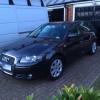
 

A3 8P Sportsback 2.0 FSi tiptronic - is this normal ?

Featured Replies

I have recently purchased an A3 8P 5dr 2.0 SE FSi tiptronic 2005. It replaced a 2006 1.6 SE manual.

I have noticed a strange characteristic when accelerating - when I gothrough 25-35mph I get a weird sensation as though the engine or gearbox is wobbling side to side. This disappears again at around 35mph.Shortly after purchasing the car, I had the wheels balanced and thetracking done which eliminated some shakes I was getting when on themotorway.

I am trying to understand whether this issue is a "characteristic" ofthe 2.0FSi with tiptronic or whether it may be an indication of something more serious that I need to get looked at eg steering column etc.

Any pointers would be gratefully received, although if you are giving me scary scenarios please back it up with the reason for such a diagnosis - I would hate to go running back to the dealer saying that the car was falling to pieces !


Mine's the same model as yours, (2006) and it doesn't do that.

  • Author

Thanks, its useful to get a positive confirmation

Create an account or sign in to comment


Background Picker
Customize Layout

Account

Navigation

Search

Search

Configure browser push notifications

Chrome (Android)
  1. Tap the lock icon next to the address bar.
  2. Tap Permissions → Notifications.
  3. Adjust your preference.
Chrome (Desktop)
  1. Click the padlock icon in the address bar.
  2. Select Site settings.
  3. Find Notifications and adjust your preference.