




Skip to content
View in the app

A better way to browse. Learn more.

Audi Owners Club (UK)

A full-screen app on your home screen with push notifications, badges and more.

To install this app on iOS and iPadOS
  1. Tap the Share icon in Safari
  2. Scroll the menu and tap Add to Home Screen.
  3. Tap Add in the top-right corner.
To install this app on Android
  1. Tap the 3-dot menu (⋮) in the top-right corner of the browser.
  2. Tap Add to Home screen or Install app.
  3. Confirm by tapping Install.

Welcome to the Audi Owners' Club - An Independent community!

Membership is completely free, and our community is built by enthusiasts, for enthusiasts. We’re a proudly independentnon-official club, so all the help and opinions you’ll find here come directly from members with real experience of Audi ownership.

Join the club now!
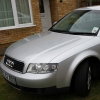
 

A4 B6 2.0 ALT 2002

Featured Replies

Hi!

I have bought my 2002 A4 B6 2.0 few days ago. Straight away ran in some problems with the car. First of all dipstick tube broke (typical)

when i have replaced that i ve noticed, that breather pipe seems to be loose :blink:

After further investigation (just took the manifold cover off) it was clear that all joints on the breather pipe as gone, incl the one on the filter hosing (please see pic, red markers are the places where the pipe broke), leaving open hole in oil filter housing - hopefully nothing will get in there.. I  have ordered the parts, but i am not that mechanically minded to tackle it myself.

Is there anyone around Newark, Lincoln etc, who could get it done for me as Vw specialist wants 220 for the job  :wacko:

That part

Picture

98963c.jpg

I will be very grateful for any help as because of fumes its very bad to drive it

Regards

Create an account or sign in to comment


Background Picker
Customize Layout

Account

Navigation

Search

Search

Configure browser push notifications

Chrome (Android)
  1. Tap the lock icon next to the address bar.
  2. Tap Permissions → Notifications.
  3. Adjust your preference.
Chrome (Desktop)
  1. Click the padlock icon in the address bar.
  2. Select Site settings.
  3. Find Notifications and adjust your preference.