




Skip to content
View in the app

A better way to browse. Learn more.

Audi Owners Club (UK)

A full-screen app on your home screen with push notifications, badges and more.

To install this app on iOS and iPadOS
  1. Tap the Share icon in Safari
  2. Scroll the menu and tap Add to Home Screen.
  3. Tap Add in the top-right corner.
To install this app on Android
  1. Tap the 3-dot menu (⋮) in the top-right corner of the browser.
  2. Tap Add to Home screen or Install app.
  3. Confirm by tapping Install.

Welcome to the Audi Owners' Club - An Independent community!

Membership is completely free, and our community is built by enthusiasts, for enthusiasts. We’re a proudly independentnon-official club, so all the help and opinions you’ll find here come directly from members with real experience of Audi ownership.

Join the club now!
 

Hello from Swindon/Cirencester

Featured Replies

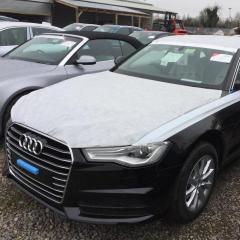
Well, just picked up my brand spanking new A6 (C7) 2.0TDi Ultra S-tronic in Brilliant Black, feeling like Christmas has come early :)


Have previously owned the following (although never new, this is my first time!):-


1987 Audi 100 2.2E

1987 Audi 90 2.2

1988 Audi 90 2.3 3-speed auto (although it never much like 3rd gear)

2001 Audi A6 Avant 2.7bi-turbo (ruined my clean driving licence!!!)


Hello everyone!

  • Author

Thanks Trevor.


There have been "other" cars, but i'm too ashamed to mention them here :)

Showing my age now (late 30s), but more interested in getting some decent fuel consumption figures, as opposed to the 23mpg I got from the Avant (on a good day)!!!

Hi Barry

Welcome to the forum!

Great car selection, glad to have you on board ;) 

Regards

Bradley

  • Author

Thank you both.

I actually spent a few months driving for service and sales at our local Audi dealer back in 2004/5 and got to drive near enough everything in the range, but I can safely say this A6 is an even better drive than the A8 was back then!

Create an account or sign in to comment


Background Picker
Customize Layout

Account

Navigation

Search

Search

Configure browser push notifications

Chrome (Android)
  1. Tap the lock icon next to the address bar.
  2. Tap Permissions → Notifications.
  3. Adjust your preference.
Chrome (Desktop)
  1. Click the padlock icon in the address bar.
  2. Select Site settings.
  3. Find Notifications and adjust your preference.