


Leaderboard



Popular Content
Showing content with the highest reputation on 02/03/2021 in all areas
-
1 pointThank you both for your replies. we have found the problem, the DPF is blocked, we removed the exhaust from the manifold and it starts and runs. Why the DPF would block up in such a short time we dont know yet. Maybe its destroyed inside or fallen apart we dont know yet. But thanks for taking the time to reply1 point
-
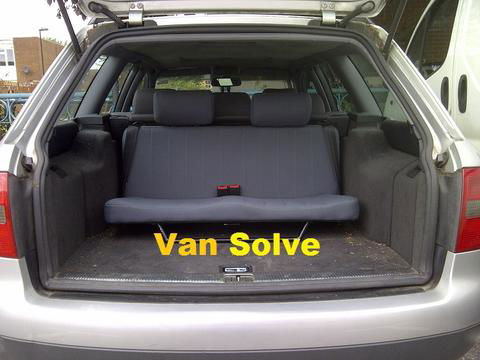
1 pointHello all, I know some members who own a6 c5 estates have been interested in the 7 seat conversion. I have found a company who can supply and fit the rear seats and carry out the conversion. The company is called Van Solve and they are based in Essex. The conversion costs £1429.99 and this includes fitting which takes 3 hours. All parts are new and you get a certificate of conformity. However the seats do differ from those fitted by Audi from the factory but they are also removable when not required just like the originals. On looking at the image the seat belts are mounted differently and you don't get any rear cup holders/storage on the side boot trims. Heres the link and image for those members who are interested: https://van-solve.com/collections/frontpage/products/mercedes-benz-c-class-estate-7-seat-conversion-07-2014 please note I'm not affiliated with Van Solve, I just thought I'd share the info in case it's useful :) cheers steve
 1 point
