




Skip to content
View in the app

A better way to browse. Learn more.

Audi Owners Club (UK)

A full-screen app on your home screen with push notifications, badges and more.

To install this app on iOS and iPadOS
  1. Tap the Share icon in Safari
  2. Scroll the menu and tap Add to Home Screen.
  3. Tap Add in the top-right corner.
To install this app on Android
  1. Tap the 3-dot menu (⋮) in the top-right corner of the browser.
  2. Tap Add to Home screen or Install app.
  3. Confirm by tapping Install.

Welcome to the Audi Owners' Club - An Independent community!

Membership is completely free, and our community is built by enthusiasts, for enthusiasts. We’re a proudly independentnon-official club, so all the help and opinions you’ll find here come directly from members with real experience of Audi ownership.

Join the club now!
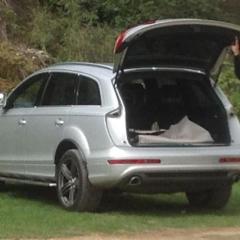
 

Q7 air suspension

Featured Replies

Hi all,

when choosing to change settings from comfort to dynamic, when I scroll to this option, it isn't highlighted so can't choose it. All I have is auto, off-road, comfort and auto, why is this ??

also the button in the boot to lower the back of the car doesn't seem to work, it lights up but nothing happens.

any ideas guys ??

  • 4 weeks later...

I just got told that there is a central hub which communicates with the various ECU units in the car. If this central hub starts to break down then the MMI starts to not receive or display all the settings. Mine had no screen for air suspension and this box is one issue and the compressor may now have overheated and bust.

  • 3 weeks later...
  • Author

Hi Pete, got it checked and the towing assistance button was still on, thus keeping the dynamic setting unlit.

Glad it got resolved! Mines still useless and there is a discussion between me and the folk I got it off which, hopefully, means I'll get my money back!

Create an account or sign in to comment


Background Picker
Customize Layout

Account

Navigation

Search

Search

Configure browser push notifications

Chrome (Android)
  1. Tap the lock icon next to the address bar.
  2. Tap Permissions → Notifications.
  3. Adjust your preference.
Chrome (Desktop)
  1. Click the padlock icon in the address bar.
  2. Select Site settings.
  3. Find Notifications and adjust your preference.