




Skip to content
View in the app

A better way to browse. Learn more.

Audi Owners Club (UK)

A full-screen app on your home screen with push notifications, badges and more.

To install this app on iOS and iPadOS
  1. Tap the Share icon in Safari
  2. Scroll the menu and tap Add to Home Screen.
  3. Tap Add in the top-right corner.
To install this app on Android
  1. Tap the 3-dot menu (⋮) in the top-right corner of the browser.
  2. Tap Add to Home screen or Install app.
  3. Confirm by tapping Install.


Welcome to the Audi Owners' Club - An Independent community!

Membership is completely free, and our community is built by enthusiasts, for enthusiasts. We’re a proudly independentnon-official club, so all the help and opinions you’ll find here come directly from members with real experience of Audi ownership.

Join the club now!
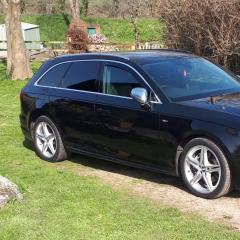
 

A4 B9 Avant service

Featured Replies

Hi All.

New here...first post.

I'm off tomorrow to Audi main dealer for an engine service and the S-Tronic service 

Bought car at 46500 mls  3 months ago....(first Audi in a while...since my coupe in '86, and a 200 Quattro saloon  before that).

Now 53000 mls.....changing to long life service interval as I do above average mileage.

Searched local independents and was not much more cost to use Audi dealer...and quicker, so here we go !

Best wishes


Many thanks for being in touch David. 

I think you are making a wise move in opting for the Longlife service schedule since it seems you will be covering >25k miles a year. My stab at the service intervals would be that it’s likely to run to 9 months (generally c18k intervals).

What I would point out is that Audi are likely to recommend the replacements of certain wear items based on the ‘before next time they see it’ it will need doing, so you could find yourself say changing brake pads etc. before they come near to acceptable limits. 

Kind regards,

Gareth. 


  • Author

Thanks Gareth.

Create an account or sign in to comment


Background Picker
Customize Layout

Account

Navigation

Search

Search

Configure browser push notifications

Chrome (Android)
  1. Tap the lock icon next to the address bar.
  2. Tap Permissions → Notifications.
  3. Adjust your preference.
Chrome (Desktop)
  1. Click the padlock icon in the address bar.
  2. Select Site settings.
  3. Find Notifications and adjust your preference.