




Skip to content
View in the app

A better way to browse. Learn more.

Audi Owners Club (UK)

A full-screen app on your home screen with push notifications, badges and more.

To install this app on iOS and iPadOS
  1. Tap the Share icon in Safari
  2. Scroll the menu and tap Add to Home Screen.
  3. Tap Add in the top-right corner.
To install this app on Android
  1. Tap the 3-dot menu (⋮) in the top-right corner of the browser.
  2. Tap Add to Home screen or Install app.
  3. Confirm by tapping Install.

Welcome to the Audi Owners' Club - An Independent community!

Membership is completely free, and our community is built by enthusiasts, for enthusiasts. We’re a proudly independentnon-official club, so all the help and opinions you’ll find here come directly from members with real experience of Audi ownership.

Join the club now!
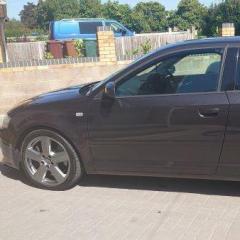
 

2006 Audi a3 3.2 v6 2 Door Sportsback Quattro

Featured Replies

Hi guys

Looking to find bump stops on suspension on my sons car.... failed MOT but contacting Audi Dealership.

The Front has one type only ( not a problem )

Rear Has two types round type or curved type ? they have asked me to confirm, but to do that I have to remove everything to find out, & then order part which takes 2-3 days to get...Need car back on road asap, I suggested to dealership if I order both rear type ones & return ones not used, but they say they have to order parts in & non refundable..


Can anyone suggest parts or know if they have come across this. ??


Thanks in advance 👍

Ray

Hello Ray,

Thanks for being in touch. 

Are both types interchangeable by any chance - i.e. same fixing points and set up? 

Could I suggest:-

Asking the MOT station to put the car back on the ramp and take a photo of your ones. 

Trying TPS (Trade Parts Supplies) - armed with the VIN.

Try another dealer. 

As daft as it sounds - try EBay. Many of the sellers are very helpful in identifying differences. Worth a try. 

Kind regards,

Gareth. 


Create an account or sign in to comment


Background Picker
Customize Layout

Account

Navigation

Search

Search

Configure browser push notifications

Chrome (Android)
  1. Tap the lock icon next to the address bar.
  2. Tap Permissions → Notifications.
  3. Adjust your preference.
Chrome (Desktop)
  1. Click the padlock icon in the address bar.
  2. Select Site settings.
  3. Find Notifications and adjust your preference.