




Skip to content
View in the app

A better way to browse. Learn more.

Audi Owners Club (UK)

A full-screen app on your home screen with push notifications, badges and more.

To install this app on iOS and iPadOS
  1. Tap the Share icon in Safari
  2. Scroll the menu and tap Add to Home Screen.
  3. Tap Add in the top-right corner.
To install this app on Android
  1. Tap the 3-dot menu (⋮) in the top-right corner of the browser.
  2. Tap Add to Home screen or Install app.
  3. Confirm by tapping Install.

Welcome to the Audi Owners' Club - An Independent community!

Membership is completely free, and our community is built by enthusiasts, for enthusiasts. We’re a proudly independentnon-official club, so all the help and opinions you’ll find here come directly from members with real experience of Audi ownership.

Join the club now!
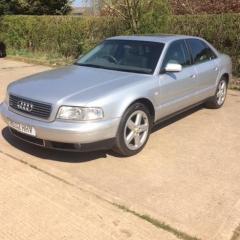
 

No Dashboard Lights on D2 2.8 Quattro

Featured Replies

I just bought this car and i am gradually going through a few jobs that need doing, so I have no cluster or dashboard lights on this car, I have checked the fuse and its ok, I have heard issues with some cars having flat batteries and when jump starting the dashboard lights don't come on any more, the previous owner did jump start the car, any ideas whats causing this.

Its a 2002 D2 2.8 Quattro.

Get a vcds scan to check for any faults first 

If your not far away from me (guildford ) i can scan :)

  • Author

i just did a scan with vcds lite, and it did come up with a few fault codes, but i cant see anything related to the dash lights, one thong i did notice is that vcds is not communicating with the central convenience controller, im trying to work my way through these fault codes at the moment, this car has been stood for 2 years with a flat battery, ive cleared all the codes and will check later to see if they come back, i also had a fault code, the cd works ok, but the radio will not tune to any stations 

Control Module Part Number: 4D0 035 186 G
  Component and/or Version: concert II  GRO    D002
           Software Coding: 00201
            Work Shop Code: WSC 00000
                      VCID: 263F759BD1FF
1 Fault Found:
01042 -  Control Module; Not Coded
        35-00 -   -
 
Monday, 16 April 2018, 18:33:14.
VCDS-Lite Version: Release 1.2
Control Module Part Number: 4D0 919 035 AQ
  Component and/or Version: KOMBI+WEGFAHRS.VDO D39
           Software Coding: 00462
            Work Shop Code: WSC 02314
                      VCID: 759D62D75CD9
           Additional Info: WAUZZZ4DX2N004932     AUZ7Z0A1917729
1 Fault Found:
00668 -  Supply Voltage Terminal 30
        53-10 -  Supply Voltage Too Low - Intermittent
 

Create an account or sign in to comment


Background Picker
Customize Layout

Account

Navigation

Search

Search

Configure browser push notifications

Chrome (Android)
  1. Tap the lock icon next to the address bar.
  2. Tap Permissions → Notifications.
  3. Adjust your preference.
Chrome (Desktop)
  1. Click the padlock icon in the address bar.
  2. Select Site settings.
  3. Find Notifications and adjust your preference.