




Skip to content
View in the app

A better way to browse. Learn more.

Audi Owners Club (UK)

A full-screen app on your home screen with push notifications, badges and more.

To install this app on iOS and iPadOS
  1. Tap the Share icon in Safari
  2. Scroll the menu and tap Add to Home Screen.
  3. Tap Add in the top-right corner.
To install this app on Android
  1. Tap the 3-dot menu (⋮) in the top-right corner of the browser.
  2. Tap Add to Home screen or Install app.
  3. Confirm by tapping Install.

Welcome to the Audi Owners' Club - An Independent community!

Membership is completely free, and our community is built by enthusiasts, for enthusiasts. We’re a proudly independent, non-official club, so all the help and opinions you’ll find here come directly from members with real experience of Audi ownership.

Join the club now!
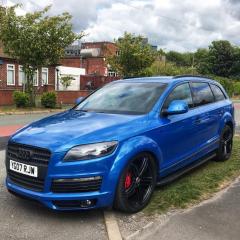
 

Paint Mystery

Featured Replies

Hi all - cry out for help due to  impulse buy for a bit of fun - but has left me pondering the paint code?

Found it in the boot - but very worn - code Im guessing ti reads as doesn't return any paint 😞

Can anyone help? 2 pics attached. (looks like SK99 but think thats white?)

thanks in advance

IMG_9188.jpeg

IMG_9212.jpeg

Welcome to the forum David, you'll find the members on here are a friendly and helpful bunch 🙂 

I believe the paint is an Audi exclusive colour called pelican blue but is also known as kingfisher pearlesant Blue. I believe the paint code is LY5T. 

If your car comes with the original owners service book then a similar sticker to the one in the boot can be found in the inside of the front cover. 

Cheers

Steve 


  • Author

That’s brilliant many thanks - not at all like the sticker then! 
I’ll dig out the books when I get home Friday and have a look for the replicated sticker. But many thanks. It does indeed have a pearlescent look to it under the sun so sounds right.

  • 4 weeks later...
  • Author

ok so cars in the paintshop apparently its: LZ5F Sprint Blue 

Exciting times!

need to get out more! 🙂

IMG_9434.jpg

1 hour ago, Rankers said:

ok so cars in the paintshop apparently its: LZ5F Sprint Blue 

Exciting times!

need to get out more! 🙂

IMG_9434.jpg

Sorry I got it wrong. Sprint blue is very similar to be fair. 

Cheers

Steve

  • Author

Hey Steve np, really appreciated your help.

I got a touch up in the colour you suggested and it was too light.

- at that point I decided to throw it into the shop anyway as they’d do a much better job than me (obviously) and pretty much every panel needed something so rather get it done nice vs a patchwork quilt! Lol. (Plus not going on holiday this year I guess!)

  • Author

got it back - gutted I didnt get bonnet and front bumper done now too!q7back.thumb.jpg.fd1913836d7d3b0ef89c7c5c1ce12972.jpgq7.thumb.jpg.2dce26fcf4692063cee6d4a0f9fa4131.jpg

34 minutes ago, Rankers said:

got it back - gutted I didnt get bonnet and front bumper done now too!q7back.thumb.jpg.fd1913836d7d3b0ef89c7c5c1ce12972.jpgq7.thumb.jpg.2dce26fcf4692063cee6d4a0f9fa4131.jpg

Wow, wow, wow! That looks amazing!! 

Top work! Would love to see that on our club displays when the shows are back on. 

Create an account or sign in to comment


Background Picker
Customize Layout

Account

Navigation

Search

Search

Configure browser push notifications

Chrome (Android)
  1. Tap the lock icon next to the address bar.
  2. Tap Permissions → Notifications.
  3. Adjust your preference.
Chrome (Desktop)
  1. Click the padlock icon in the address bar.
  2. Select Site settings.
  3. Find Notifications and adjust your preference.