




Skip to content
View in the app

A better way to browse. Learn more.

Audi Owners Club (UK)

A full-screen app on your home screen with push notifications, badges and more.

To install this app on iOS and iPadOS
  1. Tap the Share icon in Safari
  2. Scroll the menu and tap Add to Home Screen.
  3. Tap Add in the top-right corner.
To install this app on Android
  1. Tap the 3-dot menu (⋮) in the top-right corner of the browser.
  2. Tap Add to Home screen or Install app.
  3. Confirm by tapping Install.

Welcome to the Audi Owners' Club - An Independent community!

Membership is completely free, and our community is built by enthusiasts, for enthusiasts. We’re a proudly independentnon-official club, so all the help and opinions you’ll find here come directly from members with real experience of Audi ownership.

Join the club now!
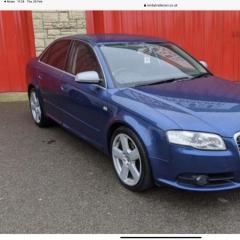
 

Help Required Window Regulator.

Featured Replies

Hello.

Is there anyone that lives in our around the Aberdeen area that can assist?

I have an A4 B7 S Line Saloon and the front drivers side electric window will not operate. When the switch for the window is pressed all I hear is strange noises and no window movement.

Due to serious illness I cannot bend over or crouch down for any length of time. Is there anyone in the local area that could strip the door down, remove old window regulator and replace with a new one then reassemble the door.

If there is, can you message myself a cost to carry out the work. The car is located outside Bucksburn head toward Haudagain Roundabout. I’m not too sure when the job can be done as I am frequently admitted in to ARI.

I look forward to any replies.

Regards,

Stuart.


  • Author

Yes Steve. Sometimes you just never know.

  • Author

Hello Steve,

I have posted on the group page but had no response back. Worst part of living in Aberdeen, I’m at the wrong end of the country.

  • Author

Yes, I think I will.

Create an account or sign in to comment


Background Picker
Customize Layout

Account

Navigation

Search

Search

Configure browser push notifications

Chrome (Android)
  1. Tap the lock icon next to the address bar.
  2. Tap Permissions → Notifications.
  3. Adjust your preference.
Chrome (Desktop)
  1. Click the padlock icon in the address bar.
  2. Select Site settings.
  3. Find Notifications and adjust your preference.