




Skip to content
View in the app

A better way to browse. Learn more.

Audi Owners Club (UK)

A full-screen app on your home screen with push notifications, badges and more.

To install this app on iOS and iPadOS
  1. Tap the Share icon in Safari
  2. Scroll the menu and tap Add to Home Screen.
  3. Tap Add in the top-right corner.
To install this app on Android
  1. Tap the 3-dot menu (⋮) in the top-right corner of the browser.
  2. Tap Add to Home screen or Install app.
  3. Confirm by tapping Install.


Welcome to the Audi Owners' Club - An Independent community!

Membership is completely free, and our community is built by enthusiasts, for enthusiasts. We’re a proudly independentnon-official club, so all the help and opinions you’ll find here come directly from members with real experience of Audi ownership.

Join the club now!
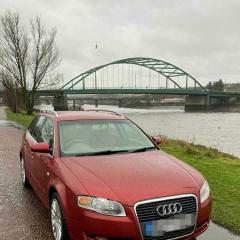
 

2007 2.0tdi cvt avant b7

Featured Replies

Hi bought this last week and had it out for a run today and can't get the cruise control to work no lights on dash . Found a few posts for manual saying about the clutch switch but mines an auto so no clutch switch ... any ideas please

  • Author

No ideas on forum ??

Apologies Peter, but this would be difficult to diagnose without access to the car, and could be anything from a poor fuse contact, through to any number of sensors. I note you say you have only bought it last week, so there should be some redress there from the seller. 

Kind regards,

Gareth. 

  • Author

Is there anyone in northeast got vagcom ? That would be willing to put my car on to see if it shows anything why the cruise control not working.

  • 4 weeks later...
  • Author

I've changed the brake switch for eliminating purposes and still no cruise control .

I've bought an OBDELEVEN PRO next gen .

If anyone can explain the process to diagnose the cause with it I would be grateful.

I've scanned for fault codes but non shown

  • Author

Been "playing" with the obdeleven and have worked out that the switch stalk functions are all working when I push pull lift and press done via live data on steering column section .

What to check next ?

Create an account or sign in to comment


Background Picker
Customize Layout

Account

Navigation

Search

Search

Configure browser push notifications

Chrome (Android)
  1. Tap the lock icon next to the address bar.
  2. Tap Permissions → Notifications.
  3. Adjust your preference.
Chrome (Desktop)
  1. Click the padlock icon in the address bar.
  2. Select Site settings.
  3. Find Notifications and adjust your preference.