




Skip to content
View in the app

A better way to browse. Learn more.

Audi Owners Club (UK)

A full-screen app on your home screen with push notifications, badges and more.

To install this app on iOS and iPadOS
  1. Tap the Share icon in Safari
  2. Scroll the menu and tap Add to Home Screen.
  3. Tap Add in the top-right corner.
To install this app on Android
  1. Tap the 3-dot menu (⋮) in the top-right corner of the browser.
  2. Tap Add to Home screen or Install app.
  3. Confirm by tapping Install.


Welcome to the Audi Owners' Club - An Independent community!

Membership is completely free, and our community is built by enthusiasts, for enthusiasts. We’re a proudly independentnon-official club, so all the help and opinions you’ll find here come directly from members with real experience of Audi ownership.

Join the club now!
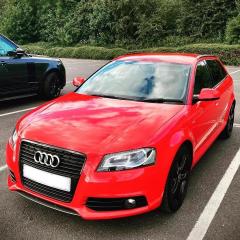
 

New A3 8P Facelift Owner

Featured Replies

Evening All 😬

Hi from Rotherham, South Yorkshire. Love my German motors but new to the Audi world.

As of this month I’ve got myself a nice A3 8P - 2012 Facelift. It’s a 2.0 TDi 170 Black Edition with only 75,000 miles. Last owner had the car for 7 years. From my own research the vehicle appears as factory standard apart from the DAB Headunit. 

I’ve already got a list building, but don’t intend to mess with it to much. But as soon as I saw the car had the common rail engine I was over the moon. Had to go Stage 1 Revo whilst they had a sale on. The car is so responsive, and yet economical at the same time. 

That will do for now I guess, I look forward to posting in the near future.

Peace ✌️ 

Carlos


F9EBB1A1-52B5-464A-B6B5-49B7C2865FB7.thumb.jpeg.d8f2766dba1b2b5732d5e097aa2f3998.jpeg


Looks great,hope you get a load of pleasure out of it ,I have A3 saloon as well and I love it,good luck Dave  Wise 

Create an account or sign in to comment


Background Picker
Customize Layout

Account

Navigation

Search

Search

Configure browser push notifications

Chrome (Android)
  1. Tap the lock icon next to the address bar.
  2. Tap Permissions → Notifications.
  3. Adjust your preference.
Chrome (Desktop)
  1. Click the padlock icon in the address bar.
  2. Select Site settings.
  3. Find Notifications and adjust your preference.