




Skip to content
View in the app

A better way to browse. Learn more.

Audi Owners Club (UK)

A full-screen app on your home screen with push notifications, badges and more.

To install this app on iOS and iPadOS
  1. Tap the Share icon in Safari
  2. Scroll the menu and tap Add to Home Screen.
  3. Tap Add in the top-right corner.
To install this app on Android
  1. Tap the 3-dot menu (⋮) in the top-right corner of the browser.
  2. Tap Add to Home screen or Install app.
  3. Confirm by tapping Install.

Welcome to the Audi Owners' Club - An Independent community!

Membership is completely free, and our community is built by enthusiasts, for enthusiasts. We’re a proudly independentnon-official club, so all the help and opinions you’ll find here come directly from members with real experience of Audi ownership.

Join the club now!
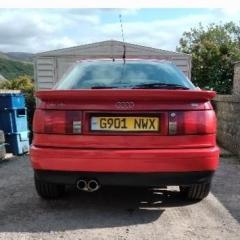
 

Best ht leads for a Audi coupe 2.3e

Featured Replies

Hi everyone i just wondered what people on the forum thought  were the best ht leads for a Audi coupe 2.3e. Ive only changed them once since ive owned the car as they looked really worn and the car wouldnt rev past 5000 rpm. I bought some unknown branded ones from euro car parts which have been ok to be fair. I just wondered if anyone had tried any which they thought were really good or improved the performance. Thanks.

hi ian audi tradition in germany still stock genuine parts pre 2004.they shoud have these but ask if they are oem as i got a grill last year and the quality was rubbish.i emailed and told them so they sent me another one and that was crap too.

they are not cheap either!

  • Author

Thanks for that. Sounds like somewhere worth checking out. Might be something i change during the summer.  

no problem

Create an account or sign in to comment


Background Picker
Customize Layout

Account

Navigation

Search

Search

Configure browser push notifications

Chrome (Android)
  1. Tap the lock icon next to the address bar.
  2. Tap Permissions → Notifications.
  3. Adjust your preference.
Chrome (Desktop)
  1. Click the padlock icon in the address bar.
  2. Select Site settings.
  3. Find Notifications and adjust your preference.