




Skip to content
View in the app

A better way to browse. Learn more.

Audi Owners Club (UK)

A full-screen app on your home screen with push notifications, badges and more.

To install this app on iOS and iPadOS
  1. Tap the Share icon in Safari
  2. Scroll the menu and tap Add to Home Screen.
  3. Tap Add in the top-right corner.
To install this app on Android
  1. Tap the 3-dot menu (⋮) in the top-right corner of the browser.
  2. Tap Add to Home screen or Install app.
  3. Confirm by tapping Install.


Welcome to the Audi Owners' Club - An Independent community!

Membership is completely free, and our community is built by enthusiasts, for enthusiasts. We’re a proudly independentnon-official club, so all the help and opinions you’ll find here come directly from members with real experience of Audi ownership.

Join the club now!
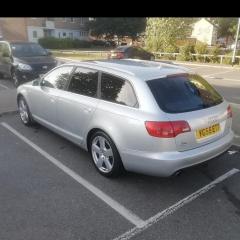
 

Audi a6 c6 quattro le mans sline special edition

Featured Replies

Hello

I got my new /used Audi A6 and it's fabulous.Unfortunately someone hit my front grill at Tesco park and the chrom grill surrounding is defect on one side,luckily nothing else.My question is  can you replace this without removing the entire grill or with the whole front bumper ? Because I had this on my 2005 model and you had to remove the front bumper to replace the complete grill.Also could that be that a le mans special edition model did not have folding mirrors?

Thanks jean

Hello Jean,

I’m not sure, but it wouldn’t surprise me that the bumper has to be removed.

Re folding mirrors. The definitive answer lies with going into your local dealer (I wouldn’t attempt this over the phone) and asking the Parts manger to give you a print out of the build record for the car’s VIN which you will give them.

Kind regards,

Gareth. 

  • Author

Hello 

First problem comes up mmi stuck this morning in the Audi logo.the buttons are dead the lights from the button didn't work.So a reset didn't help.I assume that previous owners use the cuo holder and occasional liquid went over the button down to the control module or the mmi return fibre route cable is defect.Any other tipps I would appreciate

Thanks jean


  • Author

All solved 🙂

Create an account or sign in to comment


Background Picker
Customize Layout

Account

Navigation

Search

Search

Configure browser push notifications

Chrome (Android)
  1. Tap the lock icon next to the address bar.
  2. Tap Permissions → Notifications.
  3. Adjust your preference.
Chrome (Desktop)
  1. Click the padlock icon in the address bar.
  2. Select Site settings.
  3. Find Notifications and adjust your preference.