




Skip to content
View in the app

A better way to browse. Learn more.

Audi Owners Club (UK)

A full-screen app on your home screen with push notifications, badges and more.

To install this app on iOS and iPadOS
  1. Tap the Share icon in Safari
  2. Scroll the menu and tap Add to Home Screen.
  3. Tap Add in the top-right corner.
To install this app on Android
  1. Tap the 3-dot menu (⋮) in the top-right corner of the browser.
  2. Tap Add to Home screen or Install app.
  3. Confirm by tapping Install.


Welcome to the Audi Owners' Club - An Independent community!

Membership is completely free, and our community is built by enthusiasts, for enthusiasts. We’re a proudly independentnon-official club, so all the help and opinions you’ll find here come directly from members with real experience of Audi ownership.

Join the club now!
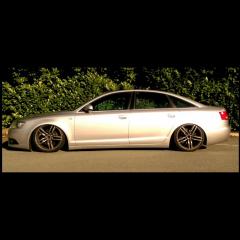
 

New A6 low rider owner

Featured Replies

Recently purchased an Audi A6 with 88k miles on the clock. Wanted something relatively practical whilst being a little different.

Had been looking to buy a 2.7 or 3.0 tdi A4 but when I saw this, I thought "why not"!

I am a big fan of cars and over the years, have had many friends who have (and still do) spend a lot of money getting their cars sorted.

My plan is to keep the car pretty standard (excluding the air and alloys) but will be looking to replace the ancient sat nav and remap at some point (funds permitting) just to get a bit more out on the engine.

Any body with experience in these areas, would love to hear your thoughts. Tried to upload a picture of the car - hope it works...

Audi A6.jpg

Create an account or sign in to comment


Background Picker
Customize Layout

Account

Navigation

Search

Search

Configure browser push notifications

Chrome (Android)
  1. Tap the lock icon next to the address bar.
  2. Tap Permissions → Notifications.
  3. Adjust your preference.
Chrome (Desktop)
  1. Click the padlock icon in the address bar.
  2. Select Site settings.
  3. Find Notifications and adjust your preference.