




Skip to content
View in the app

A better way to browse. Learn more.

Audi Owners Club (UK)

A full-screen app on your home screen with push notifications, badges and more.

To install this app on iOS and iPadOS
  1. Tap the Share icon in Safari
  2. Scroll the menu and tap Add to Home Screen.
  3. Tap Add in the top-right corner.
To install this app on Android
  1. Tap the 3-dot menu (⋮) in the top-right corner of the browser.
  2. Tap Add to Home screen or Install app.
  3. Confirm by tapping Install.

Welcome to the Audi Owners' Club - An Independent community!

Membership is completely free, and our community is built by enthusiasts, for enthusiasts. We’re a proudly independentnon-official club, so all the help and opinions you’ll find here come directly from members with real experience of Audi ownership.

Join the club now!
 

Sat Nav Advice Please

Featured Replies

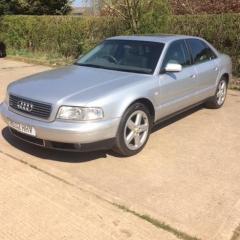
I recently bought a 2002 A8 D2 which has a Concert II radio fitted with a CD boot changer, I am a bit confused as this car has a GPS Antenna on the boot lid which makes me think that it used to have a Sat Nav Fitted, I would like to either put the car back to original specs or fit a new Sat Nav, would it be better to fit the original type of sat nav which I think should be a Navigation Plus, is there much wiring to do and are there any extra modules needed, any advice on this would be very welcome as i am not very familiar on this subject

Hi John, 

My advice would be to speak to Audi because if you give them your Vin number/reg they can give you an exact breakdown of the spec of your a8. 

If it wasn't spec'd with Sat nav then I wonder if the boot has been replaced at some point in the cars life. If it did have sat nav then you are right in saying it would have been navigation plus. 

I would imagine that the all other other components would still be fitted but you may also need the tv tuner module but this is pre digital as it may not be required anyway. But im not 100% sure to be honest. 

I can get you the part number for the navigation plus radio if required.

Cheers

Steve

  • Author

thanks very much for everyone's advice and input

Create an account or sign in to comment


Background Picker
Customize Layout

Account

Navigation

Search

Search

Configure browser push notifications

Chrome (Android)
  1. Tap the lock icon next to the address bar.
  2. Tap Permissions → Notifications.
  3. Adjust your preference.
Chrome (Desktop)
  1. Click the padlock icon in the address bar.
  2. Select Site settings.
  3. Find Notifications and adjust your preference.