




Skip to content
View in the app

A better way to browse. Learn more.

Audi Owners Club (UK)

A full-screen app on your home screen with push notifications, badges and more.

To install this app on iOS and iPadOS
  1. Tap the Share icon in Safari
  2. Scroll the menu and tap Add to Home Screen.
  3. Tap Add in the top-right corner.
To install this app on Android
  1. Tap the 3-dot menu (⋮) in the top-right corner of the browser.
  2. Tap Add to Home screen or Install app.
  3. Confirm by tapping Install.


Welcome to the Audi Owners' Club - An Independent community!

Membership is completely free, and our community is built by enthusiasts, for enthusiasts. We’re a proudly independentnon-official club, so all the help and opinions you’ll find here come directly from members with real experience of Audi ownership.

Join the club now!
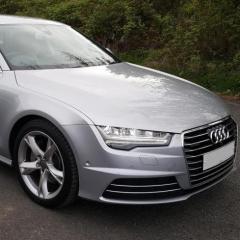
 

What have you done to your A7/S7 today

Featured Replies

Right I'll start and apologies if there is a similar thread lurking somewhere...


Gave mine a wash and coated the wheels with some Gtechniq C2

image.thumb.png.53607b9ed3d37017bd9f9c62a68e3563.png

  • Author

Thanks, it did, it's now had bird crap all over it (carefully soaked and removed) 

Not sure but I reckon silver cars attract birds to release their guts, my theory is they think they are flying over water?

I had a pan roof previously and that was terrible for attracting bird cack 

Try a black car m8 it really stands out lol mostly 2 secs after waxing the car

  • Author

I love black cars, but it was the only colour I unticked on my Autotrader etc. searches, I could never live with one. 


They look great for 10 minutes then a waft of dust comes along.. it would do my !Removed! in

16 minutes ago, sshooie said:

They look great for 10 minutes then a waft of dust comes along..

your not wrong m8 and yes does my head in too

  • 2 weeks later...

Silver all the way deffo 👍🏼

55698785-634F-4E77-9BBF-0E3983E0B86A.jpeg

F447191D-A923-4EBD-A26F-1E73A6D7C74D.jpeg

B479CA45-DDCD-4DBD-8EE0-01513419880A.jpeg

Create an account or sign in to comment


Background Picker
Customize Layout

Account

Navigation

Search

Search

Configure browser push notifications

Chrome (Android)
  1. Tap the lock icon next to the address bar.
  2. Tap Permissions → Notifications.
  3. Adjust your preference.
Chrome (Desktop)
  1. Click the padlock icon in the address bar.
  2. Select Site settings.
  3. Find Notifications and adjust your preference.