




Skip to content
View in the app

A better way to browse. Learn more.

Audi Owners Club (UK)

A full-screen app on your home screen with push notifications, badges and more.

To install this app on iOS and iPadOS
  1. Tap the Share icon in Safari
  2. Scroll the menu and tap Add to Home Screen.
  3. Tap Add in the top-right corner.
To install this app on Android
  1. Tap the 3-dot menu (⋮) in the top-right corner of the browser.
  2. Tap Add to Home screen or Install app.
  3. Confirm by tapping Install.


Welcome to the Audi Owners' Club - An Independent community!

Membership is completely free, and our community is built by enthusiasts, for enthusiasts. We’re a proudly independent, non-official club, so all the help and opinions you’ll find here come directly from members with real experience of Audi ownership.

Join the club now!
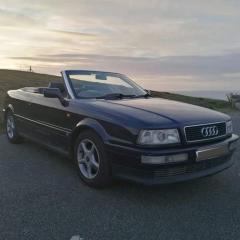
 

Advice needed / Apreciated!!

Featured Replies

Hello, I'm new to this forum, therefore not sure where to put my enquiry lol. (Its taken me 40 mins to get to this stage 😂) I am great full for any help I can get!

I have a 1996 cabriolet 2.0 E proline, my father and I have done a lot of mechanical work on beauty, but faced 3 issues we can't manage to complete.

1st problem: fog lights won't turn on (all bulbs are fine)

2nd problem: airbag warning light constantly on ( been told to check wiring underneath seats... can't find any cables / wiring. We even taken seats out and that was to repair the leather)

3rd problem: driver & passenger seat belts won't retract.

Garages I have contacted are refusing to mot the car until these issues are resolved! 

Apologies for the long post! I appreciate any advice given, I hope you have all had a lovely Christmas, hope to have an Audi meet up in the future! 😁

Hi ian,have you had a diagnostic check done to see what the airbag issue is?i find on these models that the airbag light is slow to go out if theyve been parked up for a while,maybe get it plugged in and see can fault be cleared.

the seat belt probably need to be fully extended and the cleaned with warm soapy water,also some lubricant on the runners will help.its worth a try anyway.greg


Create an account or sign in to comment


Background Picker
Customize Layout

Account

Navigation

Search

Search

Configure browser push notifications

Chrome (Android)
  1. Tap the lock icon next to the address bar.
  2. Tap Permissions → Notifications.
  3. Adjust your preference.
Chrome (Desktop)
  1. Click the padlock icon in the address bar.
  2. Select Site settings.
  3. Find Notifications and adjust your preference.