




Skip to content
View in the app

A better way to browse. Learn more.

Audi Owners Club (UK)

A full-screen app on your home screen with push notifications, badges and more.

To install this app on iOS and iPadOS
  1. Tap the Share icon in Safari
  2. Scroll the menu and tap Add to Home Screen.
  3. Tap Add in the top-right corner.
To install this app on Android
  1. Tap the 3-dot menu (â‹®) in the top-right corner of the browser.
  2. Tap Add to Home screen or Install app.
  3. Confirm by tapping Install.


Welcome to the Audi Owners' Club - An Independent community!

Membership is completely free, and our community is built by enthusiasts, for enthusiasts. We’re a proudly independent, non-official club, so all the help and opinions you’ll find here come directly from members with real experience of Audi ownership.

Join the club now!
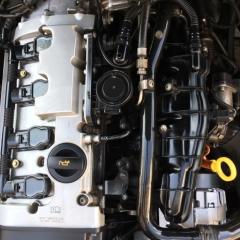
 

P0089

Featured Replies

I have just started smelling fuel I had new injectors fitted about 6 weeks ago getting a p0089 code after I took it on a motorway run  any ideas .

  • Author

Thankyou Steve could the smell be coming from the fuel pressure sensor it is 17 years old is the p0089 code related to the sensor. I supplied the parts to a garage for them to fit it was £200 labour two hours after getting car back car started misfiring again I found out a new injector had stuck open so I got a replacement had to £200 again to fit injector car has been ok for six weeks until I did a motorway run . The next day driving to work I could smell fuel for a short while then it went then on way home from work I could smell it again only for a short while looks like I’m going to pay another £200 to take off the manifold again the car is a money pit but I can’t bring my self to get rid of it I have spent so much money on this car .

  • 3 weeks later...
  • Author

I fixed problem it was fuel pressure sensor on the fuel rail I had a p0089 code and could smell fuel 

Create an account or sign in to comment


Background Picker
Customize Layout

Account

Navigation

Search

Search

Configure browser push notifications

Chrome (Android)
  1. Tap the lock icon next to the address bar.
  2. Tap Permissions → Notifications.
  3. Adjust your preference.
Chrome (Desktop)
  1. Click the padlock icon in the address bar.
  2. Select Site settings.
  3. Find Notifications and adjust your preference.