




Skip to content
View in the app

A better way to browse. Learn more.

Audi Owners Club (UK)

A full-screen app on your home screen with push notifications, badges and more.

To install this app on iOS and iPadOS
  1. Tap the Share icon in Safari
  2. Scroll the menu and tap Add to Home Screen.
  3. Tap Add in the top-right corner.
To install this app on Android
  1. Tap the 3-dot menu (⋮) in the top-right corner of the browser.
  2. Tap Add to Home screen or Install app.
  3. Confirm by tapping Install.

Welcome to the Audi Owners' Club - An Independent community!

Membership is completely free, and our community is built by enthusiasts, for enthusiasts. We’re a proudly independentnon-official club, so all the help and opinions you’ll find here come directly from members with real experience of Audi ownership.

Join the club now!
 

Climatronic change + heated seats

Featured Replies

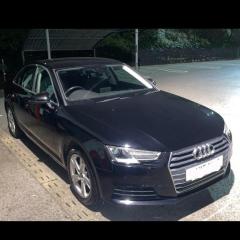
Hi all, I have a b9 A4 1.4 sport without heated seats, I am currently looking at the heated half leather S-line seats, if I was to buy and install the seats into my current car and changed the electronic climate control unit (without heated seats) to one with heated seats will it simply be plug&play even if its not from another 1.4 sport or would i need to get the component protection removed? and would the heated seats even work if i did this or would it not work

i did speak to my local dealership however they said it would be very expensive to do and not worth due to the age of the car however I only purchased the car 2 months ago and would like to keep it for a while as the b9 model is by far my favourite of the newer generation 

any help/advice on this please 

thank you

  • Author
25 minutes ago, Steve Q said:

It'll need to be coded. I'd recommend you speak to autologics or Audi retrofits to give you an idea of costs of retrofitting.  

would they be able to code it in or would they just be solely for retrofitting? 

1 minute ago, dylan.cb9 said:

would they be able to code it in or would they just be solely for retrofitting? 

They can code and retrofit. Other members have used them and been happy with the results 

  • Author

ah okay, will give them a call tomorrow thank you for the help 

Create an account or sign in to comment


Background Picker
Customize Layout

Account

Navigation

Search

Search

Configure browser push notifications

Chrome (Android)
  1. Tap the lock icon next to the address bar.
  2. Tap Permissions → Notifications.
  3. Adjust your preference.
Chrome (Desktop)
  1. Click the padlock icon in the address bar.
  2. Select Site settings.
  3. Find Notifications and adjust your preference.