




Skip to content
View in the app

A better way to browse. Learn more.

Audi Owners Club (UK)

A full-screen app on your home screen with push notifications, badges and more.

To install this app on iOS and iPadOS
  1. Tap the Share icon in Safari
  2. Scroll the menu and tap Add to Home Screen.
  3. Tap Add in the top-right corner.
To install this app on Android
  1. Tap the 3-dot menu (⋮) in the top-right corner of the browser.
  2. Tap Add to Home screen or Install app.
  3. Confirm by tapping Install.

Welcome to the Audi Owners' Club - An Independent community!

Membership is completely free, and our community is built by enthusiasts, for enthusiasts. We’re a proudly independentnon-official club, so all the help and opinions you’ll find here come directly from members with real experience of Audi ownership.

Join the club now!
 

Side repeaters

Featured Replies

Hi all.

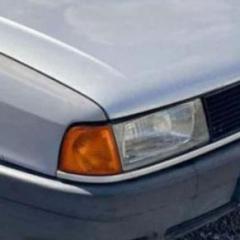
Slight dilemma. My B3 Audi 80. (1991). My wings havent got holes for the side indicators. Can i get away with not having them or do they need to be there. I know they arent painted so please excuse the primer.

IMG-20231110-WA0020.jpg

IMG-20231110-WA0019.jpg

Hello Malachy,

Your question ‘…….can I get away with it ….? is really unanswerable, since it depends on who MOT tests the car - not any opinion on here. That tester will answer your question with a fail or a pass! 
My view is that you, and any other 80 owner will know they should be fitted, and it’s not making much sense to me why you wouldn’t want to spend an extra couple of hours and properly finish the good job you seem to be doing. 
Just one person’s view Malachy, but the decision is obviously yours to make, and no one else’s. 
Kind regards,

Gareth. 

Hi Malachy

i would concur with everything Gareth has said!

Terry. 

hi malachy,when that model was sold new here in ireland that was the standard way they came with no side repeaters,a lot of them were imported secondhand from the uk and the 1st tell tale sign of a uk import was the side repeaters.so they were definitely sold in others countries like this as standard.Greg.

Thanks Gregg, 

So Mal now has a number of useful responses via. the forum, and should be sufficiently informed to make a considered course of action.
Shame he hasn’t visited the forum since he posted his plea for advice, so we have to take it he is still none the wiser.

Kind regards,

Gareth. 

Create an account or sign in to comment


Background Picker
Customize Layout

Account

Navigation

Search

Search

Configure browser push notifications

Chrome (Android)
  1. Tap the lock icon next to the address bar.
  2. Tap Permissions → Notifications.
  3. Adjust your preference.
Chrome (Desktop)
  1. Click the padlock icon in the address bar.
  2. Select Site settings.
  3. Find Notifications and adjust your preference.