




Skip to content
View in the app

A better way to browse. Learn more.

Audi Owners Club (UK)

A full-screen app on your home screen with push notifications, badges and more.

To install this app on iOS and iPadOS
  1. Tap the Share icon in Safari
  2. Scroll the menu and tap Add to Home Screen.
  3. Tap Add in the top-right corner.
To install this app on Android
  1. Tap the 3-dot menu (⋮) in the top-right corner of the browser.
  2. Tap Add to Home screen or Install app.
  3. Confirm by tapping Install.


Welcome to the Audi Owners' Club - An Independent community!

Membership is completely free, and our community is built by enthusiasts, for enthusiasts. We’re a proudly independentnon-official club, so all the help and opinions you’ll find here come directly from members with real experience of Audi ownership.

Join the club now!
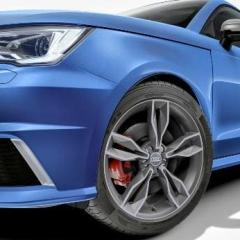
 

Audi S1 Car wraping coming soon

Featured Replies

SO i did a prompt on chatgpt a few months ago.

load post short, said to it check out 7 car sites audi s1 are listed on in the uk, colours, prices etc and asked it to make my car stand out 

This is what will be done at the end of the month from a ex staff memebers new business near Dartford Kent. If looks good, may put up for sale.

Nargo Grey gloss wrap bottom, wheels refurbed in black and black top wrap. also adding a tint to the windscreen.


s1a.JPG

  • Author

lets see how it will turn out eh?

  • 4 weeks later...
  • Author

well here we go.......


like? hate?


1000014017.jpg

1000014018.jpg

1000014019.jpg

  • Author

can change the title magnet if you want, to freshly wrapped car?

so i got a deal as the guy used to work in my campus.

Car Wrapping Body Shop London & Kent | Majestic Customz

i had roof wrapped, lower wrapped , Not all wrapped on the frame, inside, wheels refurbed and satin black painted plus blue ( red out of stock ) Chameleon tint

£2500


would sell now if money right

Edited by thatukguy_james

  • 2 weeks later...

Create an account or sign in to comment


Background Picker
Customize Layout

Account

Navigation

Search

Search

Configure browser push notifications

Chrome (Android)
  1. Tap the lock icon next to the address bar.
  2. Tap Permissions → Notifications.
  3. Adjust your preference.
Chrome (Desktop)
  1. Click the padlock icon in the address bar.
  2. Select Site settings.
  3. Find Notifications and adjust your preference.