




Skip to content
View in the app

A better way to browse. Learn more.

Audi Owners Club (UK)

A full-screen app on your home screen with push notifications, badges and more.

To install this app on iOS and iPadOS
  1. Tap the Share icon in Safari
  2. Scroll the menu and tap Add to Home Screen.
  3. Tap Add in the top-right corner.
To install this app on Android
  1. Tap the 3-dot menu (⋮) in the top-right corner of the browser.
  2. Tap Add to Home screen or Install app.
  3. Confirm by tapping Install.

Welcome to the Audi Owners' Club - An Independent community!

Membership is completely free, and our community is built by enthusiasts, for enthusiasts. We’re a proudly independentnon-official club, so all the help and opinions you’ll find here come directly from members with real experience of Audi ownership.

Join the club now!
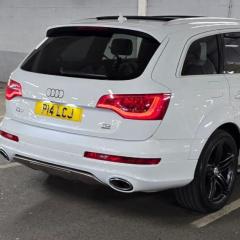
 

Audi q7 3.0 tdi new member HELP NEEDED?

Featured Replies

  • 4 weeks later...
  • Author

Had all 6 injector seals & o rings replaced, new bolts and new brackets £445 inc vat at midland vw


No more chuffing sound, they said all 6 injector seals were failed or failing and 2 dropped into cylinder head whilst removing so they had to remove head and re-fit.


Drove the car for around 40 miles now and all seems fine now 👍🏼👌🏼🤞🏼 


Cheers for all the help guys 👊🏼

20260203_104622.jpg

20260203_104509.jpg

20260203_104628.jpg

Edited by PeteQ7SportEdition
Pictures added..

  • 3 months later...

Sorry Pete just seen your email. Darkside charged me £555.59 inc vat to replace the injector seals. Seal kit + bolts/brackets was £108 + vat the rest was labour which took them around 5-6 hours. I had them service the car at the same time so my total spend was £852. (Apparently they were a sod to get out so glad I didn’t have time to do it myself).

Create an account or sign in to comment


Background Picker
Customize Layout

Account

Navigation

Search

Search

Configure browser push notifications

Chrome (Android)
  1. Tap the lock icon next to the address bar.
  2. Tap Permissions → Notifications.
  3. Adjust your preference.
Chrome (Desktop)
  1. Click the padlock icon in the address bar.
  2. Select Site settings.
  3. Find Notifications and adjust your preference.