




Skip to content
View in the app

A better way to browse. Learn more.

Audi Owners Club (UK)

A full-screen app on your home screen with push notifications, badges and more.

To install this app on iOS and iPadOS
  1. Tap the Share icon in Safari
  2. Scroll the menu and tap Add to Home Screen.
  3. Tap Add in the top-right corner.
To install this app on Android
  1. Tap the 3-dot menu (⋮) in the top-right corner of the browser.
  2. Tap Add to Home screen or Install app.
  3. Confirm by tapping Install.

Welcome to the Audi Owners' Club - An Independent community!

Membership is completely free, and our community is built by enthusiasts, for enthusiasts. We’re a proudly independentnon-official club, so all the help and opinions you’ll find here come directly from members with real experience of Audi ownership.

Join the club now!
 

Newbie

Featured Replies

Good evening,

Newbie here, in the process of buying a new to me Q7, switching from a Skoda Superb.

Hopefully picking up the new wheels on Monday.

Dave

Hi David

Welcome to the forum!

Love the Q7's great cars :) post some pics up when you have your new toy :D

Regards

Bradley

  • 3 weeks later...
  • Author

Thanks for the welcome.
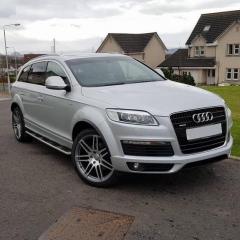
Here's a couple of picture of my new to me Q7, impressed with it it so far. It's a big beast and likes a drink. But as a mate said it's smiles per gallon.
Will be concentrating on getting it in a bit better shape, wheels, arch trim and boot lid require a little attention to get up to my standard.
Also another few bits and pieces to buy, get the engine tarracleaned and maybe even a remap but we will wait and see.

Cheers

Dave


17855533_10212310734584365_5872456825133279243_o.jpg

17855076_10212310737224431_7480731796634588441_o.jpg

17834811_10212310739264482_8720082810996681484_o.jpg

Create an account or sign in to comment


Background Picker
Customize Layout

Account

Navigation

Search

Search

Configure browser push notifications

Chrome (Android)
  1. Tap the lock icon next to the address bar.
  2. Tap Permissions → Notifications.
  3. Adjust your preference.
Chrome (Desktop)
  1. Click the padlock icon in the address bar.
  2. Select Site settings.
  3. Find Notifications and adjust your preference.