




Skip to content
View in the app

A better way to browse. Learn more.

Audi Owners Club (UK)

A full-screen app on your home screen with push notifications, badges and more.

To install this app on iOS and iPadOS
  1. Tap the Share icon in Safari
  2. Scroll the menu and tap Add to Home Screen.
  3. Tap Add in the top-right corner.
To install this app on Android
  1. Tap the 3-dot menu (⋮) in the top-right corner of the browser.
  2. Tap Add to Home screen or Install app.
  3. Confirm by tapping Install.

Welcome to the Audi Owners' Club - An Independent community!

Membership is completely free, and our community is built by enthusiasts, for enthusiasts. We’re a proudly independentnon-official club, so all the help and opinions you’ll find here come directly from members with real experience of Audi ownership.

Join the club now!
 

New :)

Featured Replies

Hi all 

New to this forum 

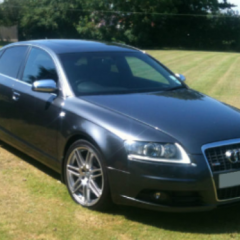
Ive got A6 C6 3.0tdi v6 le mans in dytona grey pearl . Had the car for 2 years with no poblems so far, 119k on the clock . All original MMI 2g with bose on board plus sport suspention, 19" wheels20170424_133527.thumb.png.50ab101206c9d4d12a9403ed0a7f60e9.png

20170424_133815.jpg

20170424_133743.jpg

Welcome to the forum! One of the best Audi colours in my opinion and lovely spec :) 

just letting you know that we have club stands at some of the up and coming shows. You would be more than welcome to display your a6 under the Audi Owners club banner :) 

cheers 

Steve


  • Author

Thanks , would love to but first need to get alloys refurbed and a small scrach on the front bumper fixed :) 

Keem me posted 

That's fine :) we have 3 shows coming up: 

Sun 16th July VAG Tuner @ Donington park race track, Leicestershire 

Sun 13th august Audis in the park @ Deenes park, Corby, Northamptonshire 

sat 16th September Audi Driver International show @ castle Combe race track in Wiltshire. 

Let us know if you can make any of them. And we'll get you added to the list of display cars! :) 

Create an account or sign in to comment


Background Picker
Customize Layout

Account

Navigation

Search

Search

Configure browser push notifications

Chrome (Android)
  1. Tap the lock icon next to the address bar.
  2. Tap Permissions → Notifications.
  3. Adjust your preference.
Chrome (Desktop)
  1. Click the padlock icon in the address bar.
  2. Select Site settings.
  3. Find Notifications and adjust your preference.