




Skip to content
View in the app

A better way to browse. Learn more.

Audi Owners Club (UK)

A full-screen app on your home screen with push notifications, badges and more.

To install this app on iOS and iPadOS
  1. Tap the Share icon in Safari
  2. Scroll the menu and tap Add to Home Screen.
  3. Tap Add in the top-right corner.
To install this app on Android
  1. Tap the 3-dot menu (⋮) in the top-right corner of the browser.
  2. Tap Add to Home screen or Install app.
  3. Confirm by tapping Install.

Welcome to the Audi Owners' Club - An Independent community!

Membership is completely free, and our community is built by enthusiasts, for enthusiasts. We’re a proudly independentnon-official club, so all the help and opinions you’ll find here come directly from members with real experience of Audi ownership.

Join the club now!
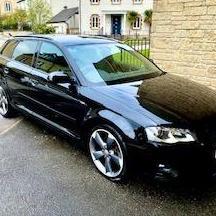
 

Wheel colour

Featured Replies

So the a3 is booked Monday for a wheel refurb, not going to go diamond cut but paint instead 

has anyone changed the colour of the diamond cut part of the rota alloys and left rest grey as I’m toying with changing from silver 


39 minutes ago, Lee harvey said:

So the a3 is booked Monday for a wheel refurb, not going to go diamond cut but paint instead 

has anyone changed the colour of the diamond cut part of the rota alloys and left rest grey as I’m toying with changing from silver 


You could go with white, red, candy red, 

  • Author

Was thinking of leaving centres grey and black instead of the diamond cut ???

Just now, Lee harvey said:

Was thinking of leaving centres grey and black instead of the diamond cut ???

What ever you go for is better than diamond cut. As diamond cut is easily damaged 

Anything but BLACK.

  • 3 months later...

Post a photo of your wheels

  • 4 months later...

diamond cut corrode after so long as its just clear coat over machined alloy, if you did want to keep the diamond cut id advise a bit of wd 40 on the face over winter to stop the road salts eating away at it 

Create an account or sign in to comment


Background Picker
Customize Layout

Account

Navigation

Search

Search

Configure browser push notifications

Chrome (Android)
  1. Tap the lock icon next to the address bar.
  2. Tap Permissions → Notifications.
  3. Adjust your preference.
Chrome (Desktop)
  1. Click the padlock icon in the address bar.
  2. Select Site settings.
  3. Find Notifications and adjust your preference.