




Skip to content
View in the app

A better way to browse. Learn more.

Audi Owners Club (UK)

A full-screen app on your home screen with push notifications, badges and more.

To install this app on iOS and iPadOS
  1. Tap the Share icon in Safari
  2. Scroll the menu and tap Add to Home Screen.
  3. Tap Add in the top-right corner.
To install this app on Android
  1. Tap the 3-dot menu (⋮) in the top-right corner of the browser.
  2. Tap Add to Home screen or Install app.
  3. Confirm by tapping Install.

Welcome to the Audi Owners' Club - An Independent community!

Membership is completely free, and our community is built by enthusiasts, for enthusiasts. We’re a proudly independentnon-official club, so all the help and opinions you’ll find here come directly from members with real experience of Audi ownership.

Join the club now!
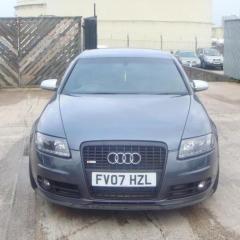
 

A6 S-Line

Featured Replies

Hi,

just joined so thought I would introduce myself!

First Audi and so far I am pretty pleased with it.

The CD multi changer is not lighting up?

Its in the glovebox (2007) model? Is there a specific fuse for this?

Regards

T3rry

Welcome to the forums:yahoo:

Nice friendly atmosphere here with plenty of Audi owners to help where they can 

not sure about the cd not lighting up but if a fuse is gone i would say its in the fuse box on the passenger side 

Paul

Welcome to the forum Terry :) 

You'll find d the members on here are a friendly and helpful bunch :) 

I'd say if the radio is still working then it could be a bulb within the radio that's at fault. 

Cheers :) 

Steve 

If the radio is still working then i means cd changer is connected . A6 c6 audio works on fiber optics connection called MOST , it could be no power to the cd changer or cd changer is dead .

There is no dedictated fuse for cd changer only so if everything else is working then its safe to assume the fuse is fine. 

Best is to take it out and check with mulitmeter if there is power in the plug 

Also if someone messed up with the cd changer it could be componet protection triggered . Do a vcds scan to check . CP removal requirers special tools that audi only have ( i think its £70 to remove )

Hope this makes sense :) 

  • Author

Thanks guys for the welcome and the advice

The radio and MMI are all working fine just cant load the cd unit. Tha Sat Nav next to it is lit up but no light on the CD?

I have been going through the forums looking at relevent posts Some really good advice and you lads know your stuff!

This VCDS scan sounds the way to go. I was going to book it in for a diagnostic at an independent they want £50 ?

Is this the same thing?

Regards

T3RRY

Should be the same . Just ask for a faults scan and print out 

Dvd satnav in thr glove box ? Unusual , normaly dvd unit is in the boot. 

Send us a pic of your glove box 

44 minutes ago, T3RRY said:

I have been going through the forums looking at relevent posts Some really good advice and you lads know your stuff!

Your welcome and thank yu! We definitely try and help.where we can :) 

As Piotr has said a pic of the glovebox will.help a d I have to agree with him that a diagnostic check might not be a good idea. 

Like I say though and if it's possible, could it be a blown bulb? 

Cheers

Steve 

  • Author

It is CD multichanger and SatNav side by side in the glove box

The red light is on the SatNav but nothing on the CD changer

It is the MMI basic I think  No SatNav disc yet  It is the red screen MMI unit

Yep mmi 2g basic plus as you have dvd sat nav as well

  • Author

Thanks for the welcome Trevor

Still trying to get through some of these forums topics!

Also keep pressing different buttons on the MMI trying to get used to it ! ! !

Hope to have most of it sussed by weekend

Create an account or sign in to comment


Background Picker
Customize Layout

Account

Navigation

Search

Search

Configure browser push notifications

Chrome (Android)
  1. Tap the lock icon next to the address bar.
  2. Tap Permissions → Notifications.
  3. Adjust your preference.
Chrome (Desktop)
  1. Click the padlock icon in the address bar.
  2. Select Site settings.
  3. Find Notifications and adjust your preference.