




Skip to content
View in the app

A better way to browse. Learn more.

Audi Owners Club (UK)

A full-screen app on your home screen with push notifications, badges and more.

To install this app on iOS and iPadOS
  1. Tap the Share icon in Safari
  2. Scroll the menu and tap Add to Home Screen.
  3. Tap Add in the top-right corner.
To install this app on Android
  1. Tap the 3-dot menu (⋮) in the top-right corner of the browser.
  2. Tap Add to Home screen or Install app.
  3. Confirm by tapping Install.

Welcome to the Audi Owners' Club - An Independent community!

Membership is completely free, and our community is built by enthusiasts, for enthusiasts. We’re a proudly independentnon-official club, so all the help and opinions you’ll find here come directly from members with real experience of Audi ownership.

Join the club now!
 

Proud New S1 Owner

Featured Replies

Good Afternoon all,

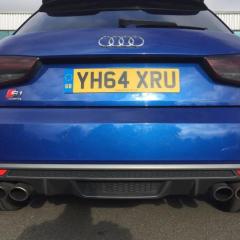
Just wanted to say hello to everyone after purchasing my 64 plate Audi S1 earlier this week! I've moved away from a 3.0si BMW Z4 Coupe, needing something more practical for work and here I am now!

The photos attached show the new beast that I've bought, alongside my old Z4!

The S1 has only done 36000 miles and is really highly specked with:

Super sports seats. Upgraded alloys. Flat bottom steering wheel. Technology pack. Design pack. Yellow stitched interior. Bose speaker system, plus much more!

At £17000 I thought this was an absolute steal coming in with only 3 owners, 2 of which being from the same family! 

Let me know what you all think!

Luke 

IMG_20171104_170247_636.jpg

IMG-20171028-WA0002.jpg

IMG-20171028-WA0004.jpg

IMG-20171028-WA0008.jpg

Welcome Luke,

 real nice rare S1 you have, pocket rocket defined... thanks for sharing 

Welcome to the forums:yahoo:

Nice friendly atmosphere here with plenty of Audi owners to help where they can 

Paul

Create an account or sign in to comment


Background Picker
Customize Layout

Account

Navigation

Search

Search

Configure browser push notifications

Chrome (Android)
  1. Tap the lock icon next to the address bar.
  2. Tap Permissions → Notifications.
  3. Adjust your preference.
Chrome (Desktop)
  1. Click the padlock icon in the address bar.
  2. Select Site settings.
  3. Find Notifications and adjust your preference.