Steve Q
Moderators
-
Joined
-
Last visited
Everything posted by Steve Q
-
You'll need a diagnostic check to see if any fault codes flag up
-
You're welcome. It took approx 3 weeks for a reply.
-
Well I contacted bag for a certificate of conformity for my A6 which is over 20 years old via this email address: [email protected] For the email you need to have the v5 in your name and address. This is the email I sent which I've done for you as a template: To whom it may concern, Please can I obtain a certificate of conformity for my 2014 Audi A1. Vin: Your name Your address Your postcode Kind regards Your name
-
Great job!
-
All those components you've mentioned could fail but if it's been well maintained then that reduces the risk. What major parts has it had changed, do you know? Might be worth asking the original owner or the mechanic if any of those parts have been changed except for the air suspension (I'm assuming hu changed the rear suspension air bags, and not the compressor?).
-
In theory the letter denotes the version of that part. So in theory a would be the first and so on. This could a So very depending on the model the screen is intended for too potentially. Ideally you'll want the whole code before ordering anything.
-
For legality it's better to have the adblue working so try cliffs way first if possible. As getting it mapped out is technically illegal
-
This is fantastic advice thanks for this. I'm going to pin the post for other members 🙂
-
To add I doubt any Audi dealer would fit a performance chip.
-
The door issue could be an issue with the striker unit. Older audis suffered from this like the A6 C5. The seat movement could be an issue with the switch.
-
Where has it been important from? You might be able to get a certificate of conformity from VAG for it which will state the emissions.
-
Might be worth speaking to autologics or Audi retrofits to see if the alarm can be coded out.
-
Id definitely say it could be the megatronics unit. You could send this off to be tested.
-
I think the screens are the same, so as long as you get a screen with the same part number you should be fine.
-
Could it be an issue with the thermostat?
-
Id recommend a diagnostic check to see if any fault codes flag up but I'll bet it's either an issue with a leaking suspension airbag, failed air compressor or air compressor relay.
-
I'd recommend a diagnostic check to see if any fault codes flag up, as it could be an issue with the control module.
-
I agree with Richard. Wire case scenario the megatronics unit is on the way out.
-
Spoiler will definitely be bonded on.
-
It might need a diagnostic check with a more sophisticated diagnostic system, no disrespect to your code reader. Erratic idle as you've rightly suggested could be the maf sensor but also the lambda sensor, cam position sensor, crank sensor, injector or injector seal etc.
-
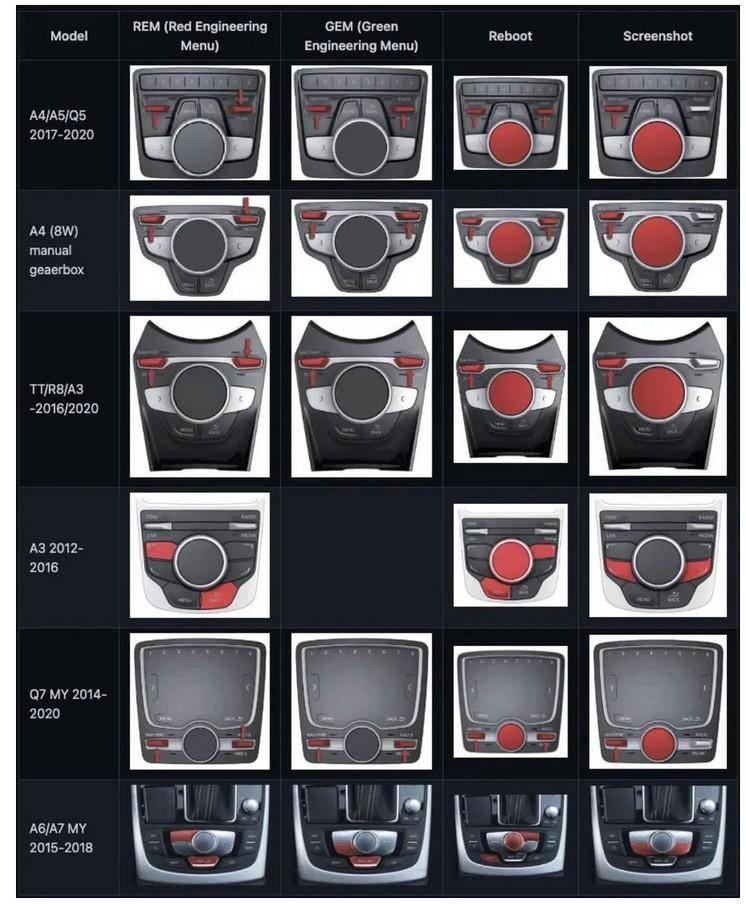
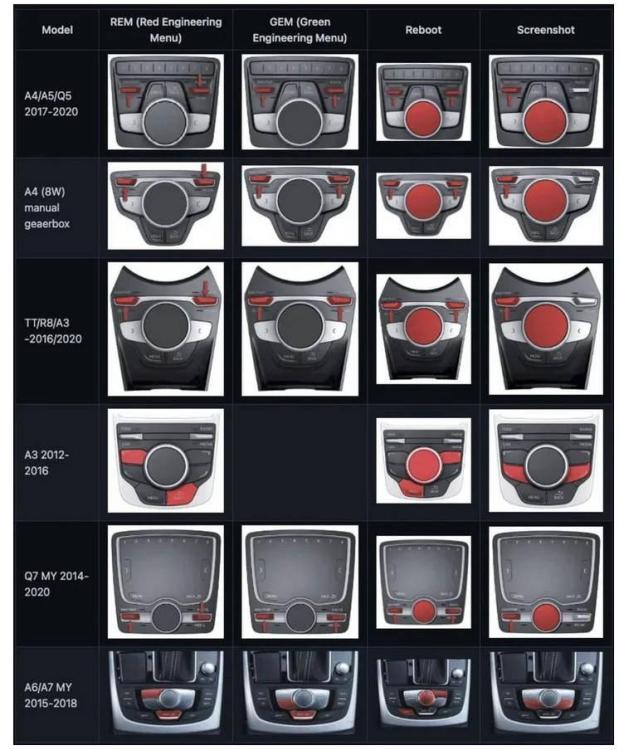
Thought I'd share the reset buttons and procedures for different models.
-
Glad it's working again 🙂 keep us posted on developments.
-
Looks great! Keep us posted on how you get on with other mods.
-
You definitely need an auto electrician or Audi independent specialist.
-
Thanks so much for the update Andy, glad you got sorted 🙂